When does Claude Code's usage limit actually reset?
9 min read
On this page
Claude Code's lockout message already tells you your real reset time - but the two windows behind it don't reset the same way. The five-hour session limit is a genuine rolling clock: hit it at 2pm, it's back at 7pm, every time. The weekly limit isn't rolling at all - it resets at one fixed point in the week, the same point regardless of when you hit the cap, which is exactly why a widely-shared GitHub gist and a Hacker News thread both reported it landing closer to 72 hours than 7 days.
code.claude.com's current error and cost-management docs on 2026-08-14 (Claude Code v2.1.222): the lockout message format is You've hit your weekly limit · resets Mon 12:00am - a fixed day and time, not a duration. The session limit's message shows a specific time the same day, because that window is genuinely rolling. Because the weekly reset point never moves, your actual wait is however long it is from right now until that fixed point - anywhere from a few hours to nearly seven days, depending only on which day you hit the cap. That variable gap, not a shorter published cycle, is what the "resets every 72 hours" reports are describing.The two windows, and how each one actually resets
Claude Code meters two budgets at the same time on a subscription plan, and Anthropic's error reference gives the exact wording for each lockout:
You've hit your session limit · resets 3:45pm
You've hit your weekly limit · resets Mon 12:00am
You've hit your Opus limit · resets 3:45pm
The session message and the weekly message look almost identical, but read the right half of each one closely - that's where the two windows stop behaving the same way. resets 3:45pm is a rolling offset: the docs confirm Claude Code "blocks further requests until the reset time shown," and for the session window that time is always five hours after whatever moment you first hit the wall. resets Mon 12:00am is a fixed point on the calendar. It doesn't shift five days forward if you hit the limit on a Wednesday instead of a Monday - it stays Monday, whichever day you're reading the message on. Opus gets its own separate weekly clock, tracked apart from every other model, but it uses the same fixed-point format as the general weekly limit, not the rolling one the session window uses. The 5-hour limit guide covers what starts and drains the rolling window in full; this one is about the fixed weekly point.
Why the weekly reset can land in 3 days instead of 7
A GitHub gist titled "the 'weekly' usage limit resets every 72 hours, not 7 days" and a Hacker News thread titled "Claude's weekly limits don't reset every 7 days" both describe the same real pattern, and a Reddit thread asking when limits actually refresh shows the confusion is widespread rather than a one-off report. None of the three name the actual mechanism - the fixed-point format quoted above explains the whole pattern without needing a second, shorter published cycle length to exist at all.
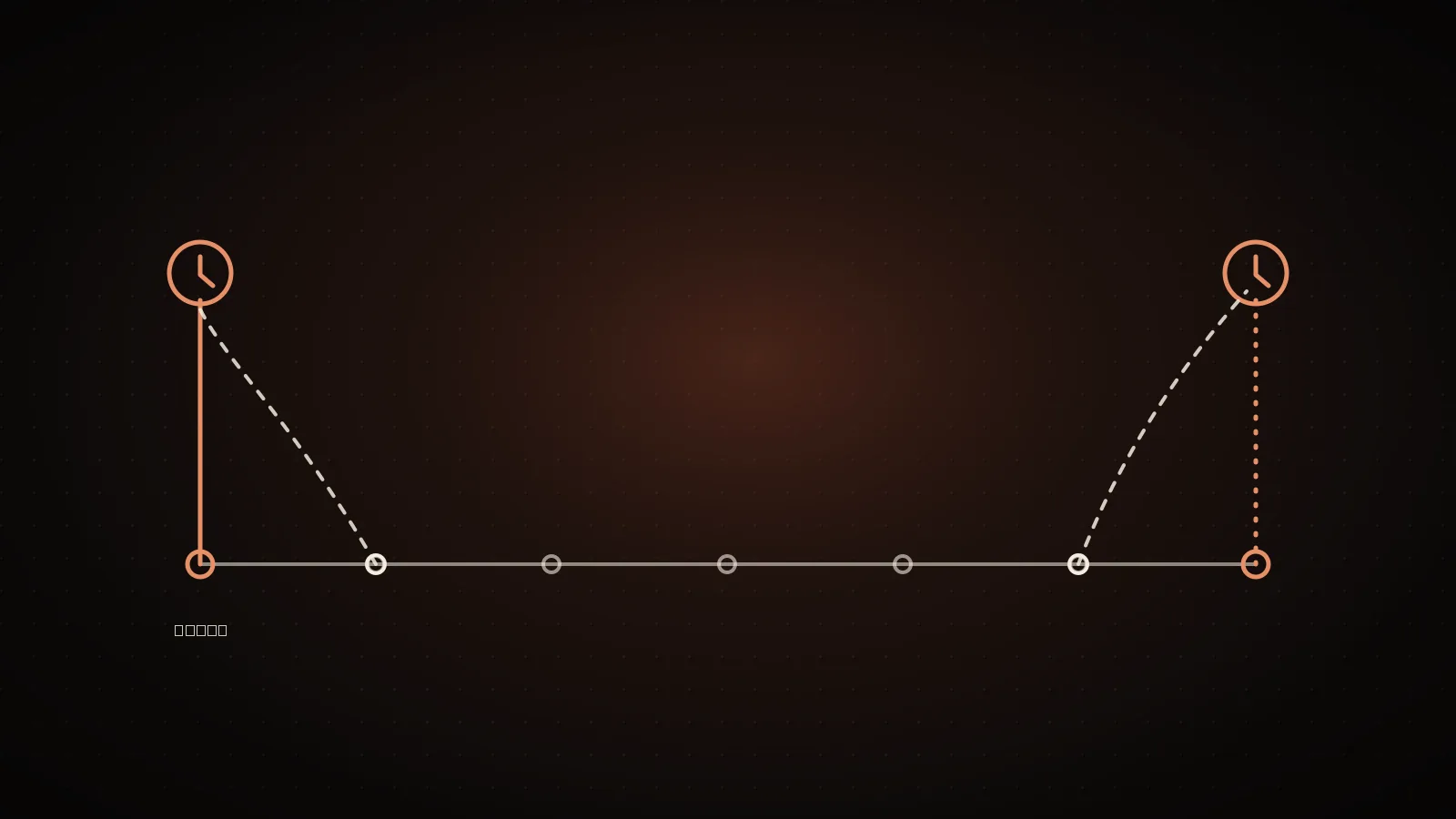
The reset anchor (white line, Mon 12:00am) never moves. Only the hit day (clay line) does.
Hit it Tuesday morning
~6 days until Mon 12:00am
Hit it Friday evening
~2.5 days until Mon 12:00am
Picture the fixed reset point as a single mark on a 7-day strip that never moves - say, Monday at midnight. Where your own wait falls depends entirely on which day you happen to hit the cap:
- Hit it Tuesday morning, right after that week's reset already passed - you're waiting nearly six days for the next one.
- Hit it Friday evening, after a heavy week of usage - you're waiting closer to 60 hours, comfortably inside the "72 hours" range the gist and HN thread both describe.
Both outcomes come from the exact same weekly allowance and the exact same fixed reset point. Nothing about the mechanism changed between them - only the day you happened to land on. Anyone whose heaviest usage clusters toward the back half of their week (a common pattern - Thursday and Friday pushes are when a real feature actually needs finishing) will see a reset that consistently reads closer to three days than seven, and conclude the "weekly" limit isn't weekly at all. It is - it's just anchored to a point in the calendar, not to the moment you got locked out.
The same shape as the session limit, just longer - hit it today, back to zero exactly a week from today. Treated as a countdown that starts at the lockout.
You've hit your weekly limit · resets Mon 12:00amThe message names a day and a time, not a duration. That point doesn't move - so the wait is however long it is from right now until that fixed point, which is rarely exactly seven days.
What changes the moment a window resets, and what doesn't
Nothing about your session itself changes when a window resets - it isn't a new conversation, a cleared context, or a fresh /clear. Only the allowance counter does. Your open session keeps whatever context it was carrying the moment before the lockout, and the next message you send still resends that full conversation exactly the way any other turn would - see what actually drains a window for why that resend is the same mechanic whether the window is fresh or nearly spent. If your first message back happens to fall outside the one-hour prompt-cache lifetime on a subscription, it also reprocesses at the full uncached rate rather than the cheaper cache-read rate, regardless of the fact that your allowance just refilled.
The one thing that does change immediately is what /usage reports: run it right after a reset and the plan bars should read back down near zero. If a request to load your plan limits is rate-limited, /usage instead shows the last bars it fetched within the past 60 minutes, marked "Showing last-known usage" - press r to force a fresh read rather than trusting a stale snapshot as confirmation the reset actually landed.
Reading your own reset time instead of guessing from a forum thread
The exact reset time is never a guess you need to make - Claude Code prints it directly in the lockout message, and you don't have to wait for a lockout to see it coming. Run /usage at any point to check both the session and weekly bars against your real account, or add the rate_limits fields to a custom status line so the same numbers stay visible on every turn instead of only surfacing after you've already been blocked. The Desktop app surfaces the same thing as a usage ring next to the model picker, and the usage limit calculator projects your own headroom across plan tiers from a baseline you give it, if you'd rather see the trend than the raw bars.
| | Session limit | Weekly limit |
| --- | --- | --- |
| Reset format shown | Time only (3:45pm) | Day + time (Mon 12:00am) |
| Resets relative to | The moment you hit it (rolling) | A fixed point in the week (anchored) |
| Typical wait once hit | Up to 5 hours | Anywhere from hours to ~7 days |
| Shared across models | Yes | Yes, except Opus (its own weekly clock) |
| Switching models with /model helps | No | No (yes for the Opus-only message) |
Spending the next window so you're not back here in three days
Confirm it's actually fresh
Run /usage - the plan bars should read back near zero. A rate-limited retry can still show last-known numbers for up to 60 minutes.
Note which day you hit it, not just that you hit it
That's the number that predicts your next wait against the fixed reset point - not "seven days," whatever day it lands on this time.
Check what actually burned the window, not just how much
A scheduled task, an idle agent teammate, or a cache miss after a long break all draw down the same allowance your typing does.
Fix the setup cost before the next fixed point arrives
Whatever ate the window once will eat it again on the same schedule unless something in the setup changes first.
The fixed reset point doesn't move to reward or punish anything you did - but what you do with a fresh window absolutely decides how far it stretches before you're reading this same message again. The full setup-habit breakdown covers the five documented drains in depth (an oversized CLAUDE.md, pasted files instead of paths, no /clear between unrelated tasks, Opus on routine work, skipping the plan step); the short version is that a window burned by three unrelated tasks left in one long thread refills the same as a window burned by one focused task, but it buys you far less real work per reset.
Where these reset rules don't apply
Team and Enterprise seats run the same rolling-session-plus-fixed-weekly structure, but as a per-seat allowance shared with Claude chat and Cowork rather than the individual pool a Pro or Max plan draws from - the seat's size depends on whether it's a Standard or Premium tier, set by an admin, not by anything in this guide. The Pro plan usage limits guide covers what an individual plan's allowance actually includes, checked against the same docs. API key billing through the Claude Console, and usage through Amazon Bedrock, Google Cloud's Agent Platform, or Microsoft Foundry, has no session-or-weekly reset at all - it's metered per token with no lockout message to read a reset time from, and the controls that apply are workspace spend limits and rate limits instead. And if the message you're actually looking at names Opus specifically rather than a session or weekly limit, /model gets you back to work immediately on Sonnet or another model - that lockout doesn't touch the shared allowance this guide is about.
FAQ
- Does the weekly Claude Code limit reset exactly 7 days after I hit it? No. It resets at one fixed day and time (shown in the lockout message, e.g.
Mon 12:00am), the same point regardless of when you hit the cap - so your actual wait is however long it is from now until that fixed point, not a constant 7 days. - Why did my weekly limit reset in less than 3 days? You most likely hit the cap shortly before the fixed weekly reset point rather than shortly after it. The reset point itself didn't move; you just landed close to it.
- Is the "resets every 72 hours" claim from Reddit and GitHub accurate? It describes a real pattern some users hit consistently, but not a separate published cycle length - it's the same fixed weekly anchor point landing a few days out for anyone whose heaviest usage clusters later in their week.
- Does the 5-hour session limit reset the same way as the weekly limit? No. The session limit is genuinely rolling - it resets exactly 5 hours after the specific moment you hit it. The weekly limit resets at a fixed calendar point that never shifts.
- What actually happens to my conversation when a window resets? Nothing. The reset only refills the allowance counter - your session, context, and conversation history are untouched, and the next message still resends the full conversation the same as any other turn.
- Does switching models with
/modelreset my session or weekly limit? No. Session and weekly limits are shared across every model, so switching doesn't restore access to those. It only works for an Opus-specific lockout, which runs on its own separate allowance.
Knowing your exact reset point doesn't tell you what actually spent the window before it - the free scan reads your real Claude Code session history and shows exactly where a window's budget went, so the next fixed reset buys you more than the last one did.
See your own numbers
These are aggregates from real sessions. Your setup is different - run the free scan and get the breakdown for your own Claude Code history. It runs locally; nothing about your code or prompts leaves your machine.
npx usagecutRun a free scan → Made by Neo
UsageCut by ClockedCode - not affiliated with Anthropic. The figures on this page are measured on real Claude Code sessions and labeled measured or estimated where it matters.